
A bare metal server is a physical machine dedicated to a single customer. You get the entire server. CPU, memory, storage, and network resources aren't shared with anyone else.
The operating system runs directly on the hardware (metal). There is no virtualization layer sitting between your workloads and the machine, unless you choose to add one yourself.
In most cloud environments, on the other hand, virtualization is the default. A single physical server is split into many virtual machines, each belonging to a different customer.
In practice, bare metal looks a lot like the traditional servers teams used before cloud became common. What’s changed is how they’re deployed. Instead of buying hardware, racking it, and maintaining it yourself, you can rent the machine from a provider and control it remotely.
Bare metal vs. cloud servers: what’s the difference?
Bare metal and cloud servers use the same underlying hardware: physical machines sitting in a data center. The difference is how you access and control that hardware.
Cloud servers run on shared physical machines behind a virtualization layer. You rent virtual machines from providers like Amazon (AWS), Google (GCP), or Microsoft (Azure). Each virtual machine is a software-defined slice of a larger physical server, sharing CPUs, memory, and network resources with other customers.
Bare metal server hosting removes that layer. You rent the whole machine and decide how it runs, including the operating system, resource allocation, and any virtualization you want to add.
A practical comparison looks like this:
Aspect | Bare Metal | Cloud Servers |
|---|---|---|
Hardware | One physical server per customer | Physical servers shared across customers |
Performance | Consistent and predictable | Can vary when resources are shared |
Scaling | Capacity planned ahead of time | Capacity added or removed on demand |
Cost | Fixed monthly price | Pay based on usage |
Control | Full control of OS and system settings | Limited to what the provider allows |
Operational Work | More setup and day-to-day upkeep | Less setup and day-to-day upkeep |
Once you understand the difference, the natural question is which is better. The answer is: it depends.
Most teams end up using both. Workloads are split between cloud and dedicated servers based on how different parts of the system behave over time, with each option bringing its own pros and cons.
What are the advantages of bare metal?
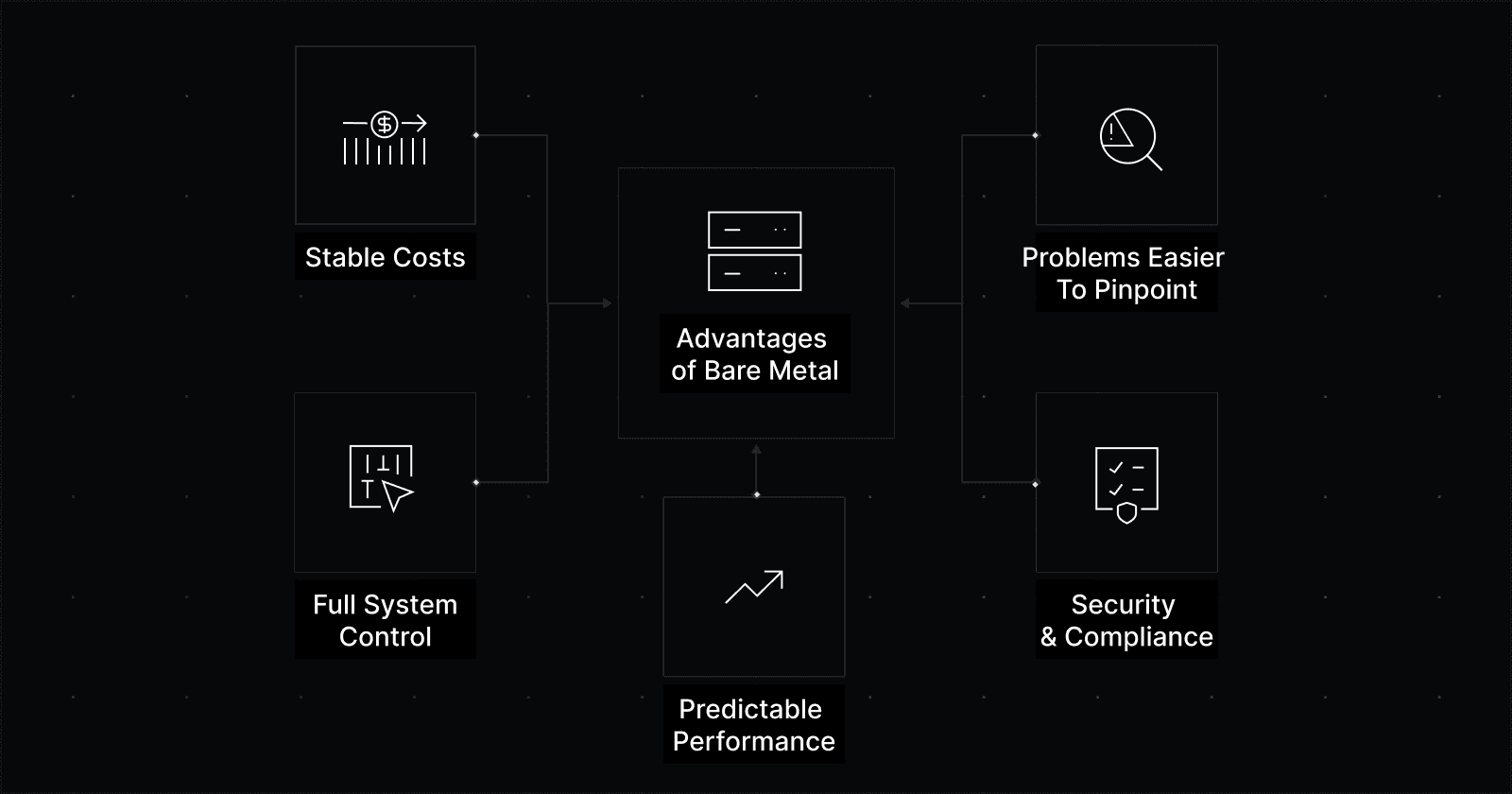
Predictable performance
With bare metal, the hardware isn’t shared with other tenants, which keeps performance consistent. CPU scheduling, disk throughput, and network latency don’t fluctuate based on other tenants’ activity.
A task that takes 20 milliseconds under normal load tends to take the same amount of time tomorrow, not 20 milliseconds one hour and 80 the next.
That predictability matters for databases, search systems, real-time processing, and any workload where small delays compound into slow pages, laggy queries, or failed requests.
Stable costs
Bare metal pricing is tied to capacity. You pay a fixed monthly rate for a known amount of CPU, memory, storage, and network bandwidth.
With competitive bare metal providers, pricing is straightforward: no per-hour billing, no surprise overages, and no metered CPU or memory usage to monitor. What you provision is what you pay for.
Network costs are usually simpler as well, with clearer bandwidth limits instead of per-gigabyte egress fees that increase as traffic grows.
For teams with steady workloads, this makes monthly spend easier to understand and predict. The bill is always the same, matching the size of the system you run.
Full system control
With bare metal, you decide how the machine runs from the ground up. You are not limited to a provider’s default setup. You choose the operating system, how disks are arranged, and how network traffic flows.
Teams running workloads on bare metal can tune servers for fast network traffic, storage-heavy jobs, or work that needs steady response times.
It's a tradeoff. You take on more responsibility, but in turn, you’re free from the restrictions of default configurations.
Problems are easier to pinpoint
When something fails on bare metal, the cause is usually obvious. A disk drops out. A network card reports errors. Memory triggers alerts.
That clarity makes incidents easier to diagnose and fix. There are fewer layers to sort through and fewer handoffs between teams or vendors. Engineers can focus on the failing component instead of wondering whether the issue sits in the application, the virtual machine, or the underlying host.
Security and compliance
For some regulated industries, dedicated infrastructure is a requirement, not a preference. Bare metal provides physical isolation and clear ownership of the system, which can simplify security reviews and compliance audits.
With fewer shared layers, it’s clearer where data lives, who can access it, and how the system is protected. Strong security practices are still required, but the underlying model is simpler to explain and verify.
What are the disadvantages of bare metal?
More challenging to scale up or down
Bare metal capacity does not appear instantly. Adding servers usually involves lead time for provisioning.
This pushes teams to think ahead about growth rather than reacting minute by minute.
The right bare metal provider can reduce this friction by keeping common server types available and shortening setup time. With reasonable planning, teams can still scale faster than many expect.
Higher operational responsibility
With bare metal, setup, updates, monitoring, and recovery are handled by your team by default. The provider you're renting from maintains the physical server, power, cooling, and network connectivity.
As an added convenience, some bare metal providers offer managed services that cover tasks like operating system setup, updates, monitoring, and hardware replacement.
In self-managed setups, the responsibility line is clear. Your team owns more of the system lifecycle than it would in a fully managed cloud service, and that shows up in day-to-day operations.
Less forgiving experimentation
Cloud environments make it easy to start servers for a quick test and shut them down soon after. That works well when teams are still figuring out what they need.
Bare metal favors more deliberate decisions. Servers are typically rented for weeks or months, which makes trial and error more costly.
Teams usually get the most value from bare metal once they understand how much traffic they have, how much data they store, and how the system is expected to perform.
FAQs
How much does a bare metal server cost?
The exact price of a bare metal server depends on the CPU, amount of memory, storage type, and available network bandwidth. Most servers fall somewhere between a few hundred and several thousand dollars per month.
Bare metal tends to make the most sense for workloads that run consistently and use most of the capacity they’re assigned. When usage is steady and predictable, a fixed monthly price is easier to plan for and justify.
What is the difference between bare metal and physical servers?
They generally mean the same thing: a single physical machine dedicated to one customer.
The term “bare metal” is most often used when physical servers are rented rather than owned. It also usually implies the server runs directly on the hardware, without a provider-added virtualization layer. The term helps distinguish these systems from cloud instances, which run on shared hardware.
How do you set up a bare metal server?
Setting up a bare metal server usually takes more work than launching a cloud instance, but it’s straightforward for teams with basic systems experience.
A typical setup process looks like this:
Choose hardware that fits the workload
Pick CPU, memory, storage, and network size based on how the system runs day to day and find hardware that matches your needs.Provision the server from the provider
Check setup time, how you access the server, and any network limits or extra fees.Install an operating system
Use a standard image or your own. Set up secure access early using keys and limited user accounts.Set up networking, storage, and security
Configure IP addresses, firewall rules, disk layout, and encryption where needed.Add monitoring, backups, and updates
Start with monitoring so issues are visible, then add backups and routine updates.
Most teams find ways to automate steps three through five after the first setup to make things easier. Once in place, bare metal systems tend to remain stable and predictable for long periods.
Final takeaways
Bare metal reduces the distance between your software and the hardware it runs on. You get a dedicated server, consistent performance, and costs tied to the capacity of your server instead of fluctuating usage.
Bare metal gives you more control, but also more responsibility. In return, it offers superior performance, more predictable cost, and improved security. For teams whose workloads no longer fit the cloud, bare metal can be an effective and reliable part of their infrastructure mix.
Rackdog helps teams get the most out of bare metal with transparent pricing, fast provisioning, and support from real engineers. Our team is ready to answer all of your questions and find the infrastructure solutions suited to your needs.
To get started, visit our contact page and get in touch with an infrastructure expert.