Pro Tips
Cloud Egress Fees Explained: How to Reduce AWS Data Transfer Costs

Rackdog Team
When teams spin up their first cloud instance, egress fees usually aren’t top of mind. Early on, traffic is low, systems are still changing, and outbound data is a small part of the bill.
As systems scale, that changes. More users mean more traffic, and outbound data can become a meaningful cost driver. For some services, the increase is manageable. For traffic-heavy workloads, it can add up quickly and leave teams searching for answers.
This post explains what cloud egress fees are, how they’re priced, why providers charge them, and the practical options teams use to manage or reduce their impact.
What is egress?
In cloud environments, egress refers to data leaving a provider’s network. This includes any traffic sent from cloud-hosted services to users, external systems, or other networks outside the provider’s boundary.
Common examples include:
API responses sent to users
Media files delivered to end users
Data transferred from an origin server to a CDN
Exports to third-party services, analytics tools, or other regions
While many cloud workloads generate relatively little outbound traffic, a small subset of customers account for a hefty share of egress costs. These are typically systems designed to deliver data continuously to users or external services, such as VPNs, video streaming platforms, and web applications serving large responses.
Ingress (data coming into the cloud) is usually free or inexpensive. Egress is where usage-based charges apply.
How do egress fees work?
Cloud platforms charge egress fees based on how much data leaves their network over a billing period. Pricing is typically metered per gigabyte or terabyte and tiered, with lower per-GB rates at higher volumes. Fees are calculated by multiplying the amount of data sent out by the rate a cloud provider charges.
Egress tends to scale alongside usage. As a service gains users, the amount of data it must send out increases as well. For many teams, this makes egress difficult to contain.
These charges apply anytime data is moved out of the cloud platform's ecosystem, not just during normal application traffic. This includes one-off or periodic activities such as copying virtual machines, exporting databases, or transferring stored data elsewhere.
Often, even sending data to another region in the same cloud still counts as egress, but most providers bill this at a lower rate.
Why do cloud platforms charge egress fees?
Cloud providers, especially hyperscalers, operate large data centers and private networks that are expensive to build and run. Not all workloads use the network the same way. Some send very little data out, while others send a lot.
Egress fees allow providers to price network usage based on how much data leaves their environment. As a product grows and serves more users, outbound traffic increases, and egress costs rise with it.
Egress pricing also makes it more expensive to move data out of a provider’s network than to move it within one. Regulators, including those in the EU, US, and UK, have pointed out that this dynamic can discourage customers from running workloads elsewhere or switching providers, since moving data out often costs more than keeping it inside.
Comparing egress costs across common cloud platforms
While the exact prices differ, egress pricing across major cloud providers follows a similar pattern.
Charges are typically based on:
Per-GB pricing
Volume tiers, where the per-GB rate drops at higher usage
Special cases, discounts, or credits tied to certain services
The table below shows published egress rates for AWS, Azure, and GCP as of February 2026. These numbers change often and may vary by region. Actual customer costs may differ due to discounts or negotiated agreements.
Consult these pricing pages from AWS, Azure, and GCP for the latest rates or those specific to your region or traffic pattern.
Provider | Free Egress Allowance | Cost per GB (over allowance) | Cost of 1 TB (1,000 GB) of Traffic | Cost of 10 TB of Traffic |
AWS | First 100 GB / month free | ~$0.09 per GB | ~$81 | ~$891 |
Azure | First 100 GB / month free | ~$0.087 per GB | ~$78 | ~$861 |
GCP | First 200 GB / month free | ~$0.085 per GB | ~$68 | ~$833 |
In most cases, the specific rate matters less than how much data you send out.
For workloads with steady, high outbound traffic (often tens or hundreds of terabytes per month), egress costs tend to scale in similar ways across all providers. Switching clouds may change the number slightly, but it rarely results in a meaningful reduction in egress spend.
For a more complete comparison of egress costs by provider, see our index of cloud egress pricing.
How to reduce egress costs
When egress costs start to rise, most teams first look for ways to reduce them while changing as little as possible. That usually means keeping workloads within the same cloud provider and focusing on sending less data, or sending it more efficiently.
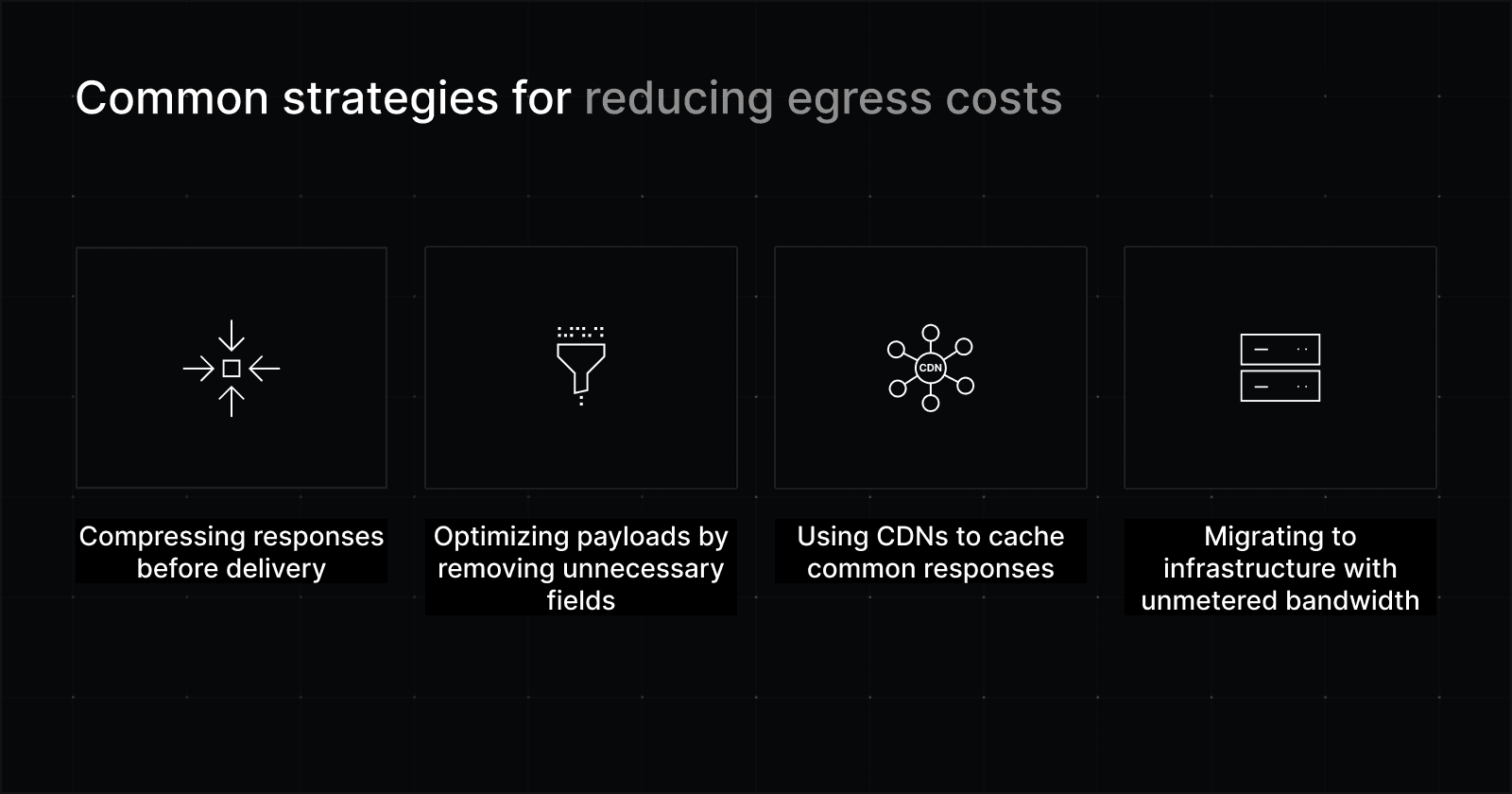
Reducing egress costs by optimizing data delivery
Teams often begin by optimizing or reducing the volume of data they send out. Most often, that means:
Compressing responses before they’re delivered
Cutting back on large payloads or unnecessary fields
These changes can help, especially early on. But once a product is serving real users at scale, there’s a floor on how much data needs to go out.
Reducing Egress Costs with CDNs
CDNs are a common next step when egress costs rise. They store copies of content closer to users, allowing repeat requests to be served without hitting the origin server. This reduces how often core cloud systems need to send data from the origin directly to users.
CDNs work best for static or cacheable content that users need to access often. For traffic that has to be generated on demand, like dynamic responses or personalized data, the CDN still has to pull from the origin. That traffic still counts as egress.
Reducing egress costs through service location
Even within the same cloud platform, traffic moving between regions is often billed as egress. Reducing how frequently data crosses regions, or how much data is transferred, can help limit costs.
However, this only goes so far. Many systems run across regions for availability, latency, or compliance reasons, which makes some cross-region traffic unavoidable.
Trading egress fees for unmetered bandwidth
At a certain point, teams stop trying to shave a few gigabytes off their cloud bill. The question shifts from “How do we send less data?” to “Does paying per gigabyte still make sense?”
That’s when flat pricing with unmetered bandwidth becomes a welcome alternative.
With this pricing model, bandwidth is included in the cost of your infrastructure. Sending more data doesn’t automatically increase the bill. For services with consistently high outbound traffic, this can make costs easier to predict and, in many cases, lower overall infrastructure spend.
You usually won’t find this kind of pricing in pay-as-you-go public cloud services. It’s more common with dedicated infrastructure, like bare metal servers.
Moving workloads to bare metal
When teams decide to change their infrastructure to address egress costs, they rarely move everything out of the cloud. Many components still benefit from cloud features like managed services or elastic scaling.
Instead, they move workloads with steady, high outbound traffic to dedicated infrastructure, such as rented bare metal servers, while keeping other systems in the cloud.
This kind of hybrid setup (some workloads in the cloud, others on dedicated servers) is a common pattern in modern cloud repatriation.
For more on moving workloads from cloud to bare metal to save on egress costs, read our guide to cloud repatriation here.
Final takeaway
Egress fees have long been a source of frustration for teams running workloads in the cloud. For providers, they are a standard part of how network usage is priced.
When outbound traffic is steady and high, shifting traffic-heavy workloads to bare metal infrastructure with flat pricing can bring greater cost predictability and lower total spend.
If you’re evaluating whether that kind of shift makes sense for your systems, infrastructure experts at Rackdog can help you look at the numbers and understand your options before making a move.