Pro Tips
Increasing AWS Cloud Costs: Knowing When It's Time to Implement an AWS Cost Reduction Strategy

Rackdog Team
You open your latest Amazon Web Services (AWS) bill and scan the numbers. The total is climbing. Line items that used to be insignificant are now meaningful costs.
Naturally, you start to wonder what it would cost and how much effort it would take to run things differently.
Plenty of teams have asked the same thing. Basecamp wrote about that journey publicly. Dropbox made headlines when they left AWS. Smaller operators have followed, some reporting savings of 70% or more.
Cloud platforms like AWS, Microsoft Azure, and Google Cloud Platform are designed to help you move fast when things are just getting started. But the same model that worked for you early — pay only for what you use, scale up on demand — can become inefficient once workloads stabilize.
This guide is for teams who are past the early stage and starting to feel the friction. The goal is to help you figure out whether your high bill actually supports considering an AWS cost reduction strategy, and what a responsible path forward looks like if it does.
Is our AWS bill high enough to justify an AWS alternative?
In reality, there's no universal threshold. Some teams comfortably pay AWS hundreds of thousands of dollars a month. For others, a jump from $100 to $1,000 is enough to start a hard conversation.
AWS’s broad catalog of instance types, managed services, and proprietary tooling can represent significant value, especially for teams that are deeply integrated into its ecosystem. In those cases, a high bill may be justified because the platform is doing a lot of heavy lifting.
So the true "point of no return" for your team depends on more than just the size of the bill.
Are you paying for capabilities you don’t use?
Are costs growing faster than your revenue?
Are you optimizing constantly, but seeing diminishing returns?
These are useful signals to keep in mind when you’re considering ways to deliver AWS cost reduction. Here are a few more indicators that suggest it may be worth evaluating a change:
Egress is a growing line item
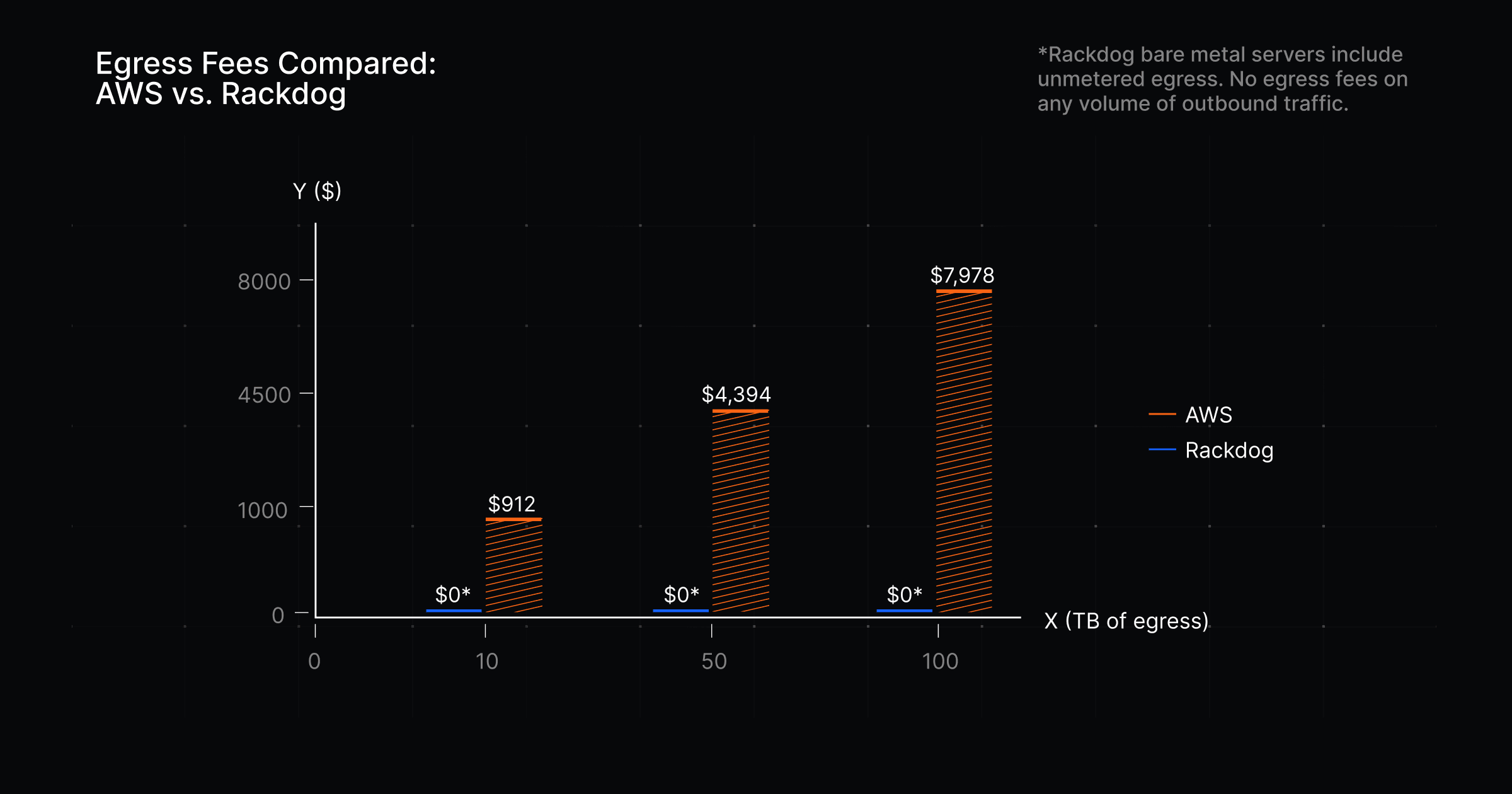
Moving data out of AWS isn’t free. Traffic going outbound to the internet is metered and appears in your bill as egress fees AWS includes 100GB of egress per month at no charge, then applies usage-based pricing beyond that, starting around $0.09 per GB and decreasing slightly at higher volumes.
For traffic-heavy services, these fees add up quickly:
10 TB/month: ~$912
50 TB/month: ~$4,394
100 TB/month: ~$7978
Egress fees are one of those sneaky cost drivers that rise in the background. As usage grows, the bill follows, often without a clear moment where anything obviously “changed” in your system.
AWS, Azure, and GCP all price egress in a similar way. If your workload pushes significant outbound traffic, moving between hyperscalers usually doesn’t solve the problem.
To remove that line item entirely, you need a different pricing model. Some infrastructure providers include outbound bandwidth in the cost of your infrastructure, meaning they don't charge egress fees (this is how Rackdog prices our bare metal servers). Bare metal provides a wide array of benefits compared to AWS.
You’re paying for flexibility you don’t use
Elastic scaling is one of AWS’s core selling points. You can spin up new instances automatically to handle changes in demand.
That matters when traffic is unpredictable. But for many teams, core services run at a steady, predictable baseline. In those cases, the ability to scale up on demand isn’t doing much for you day to day.
To make that flexibility possible, AWS has to keep capacity available so you can scale at any moment. The cost of that readiness is built into the per-hour rates you’re charged, even if you never tap into that extra capacity.
If your workloads run intermittently, that premium won’t feel consequential. If they run all day, every day, it compounds across every hour you’re running.
Teams with stable, always-on workloads tend to get better pricing from providers that charge for fixed capacity. This is a good scenario for considering an AWS alternative.
Optimization has plateaued
When costs start climbing, the natural response is to look for inefficiencies you can fix for AWS cost savings. That’s the right first step, and sometimes it’s enough.
A basic audit of your AWS bill can surface easy wins:
Idle or underutilized EC2 instances that were never shut down
Unused EBS volumes and snapshots left behind after instances are terminated
Data transfer costs from traffic moving between availability zones or regions
S3 data sitting in the wrong storage tier
There’s real savings to be found in this kind of cleanup. It’s worth doing. But those gains are finite.
If you’ve already gone through this exercise and your bill keeps rising, you’re likely dealing with something structural. At that point, incremental optimizations won’t offset the overall direction of your costs. You’ve recouped whatever AWS cost savings you can.
No amount of tuning fixes a pricing model that doesn’t match how your workloads actually run. This is another scenario that warrants an AWS alternative.
AWS Cost Reduction: A helpful decision framework
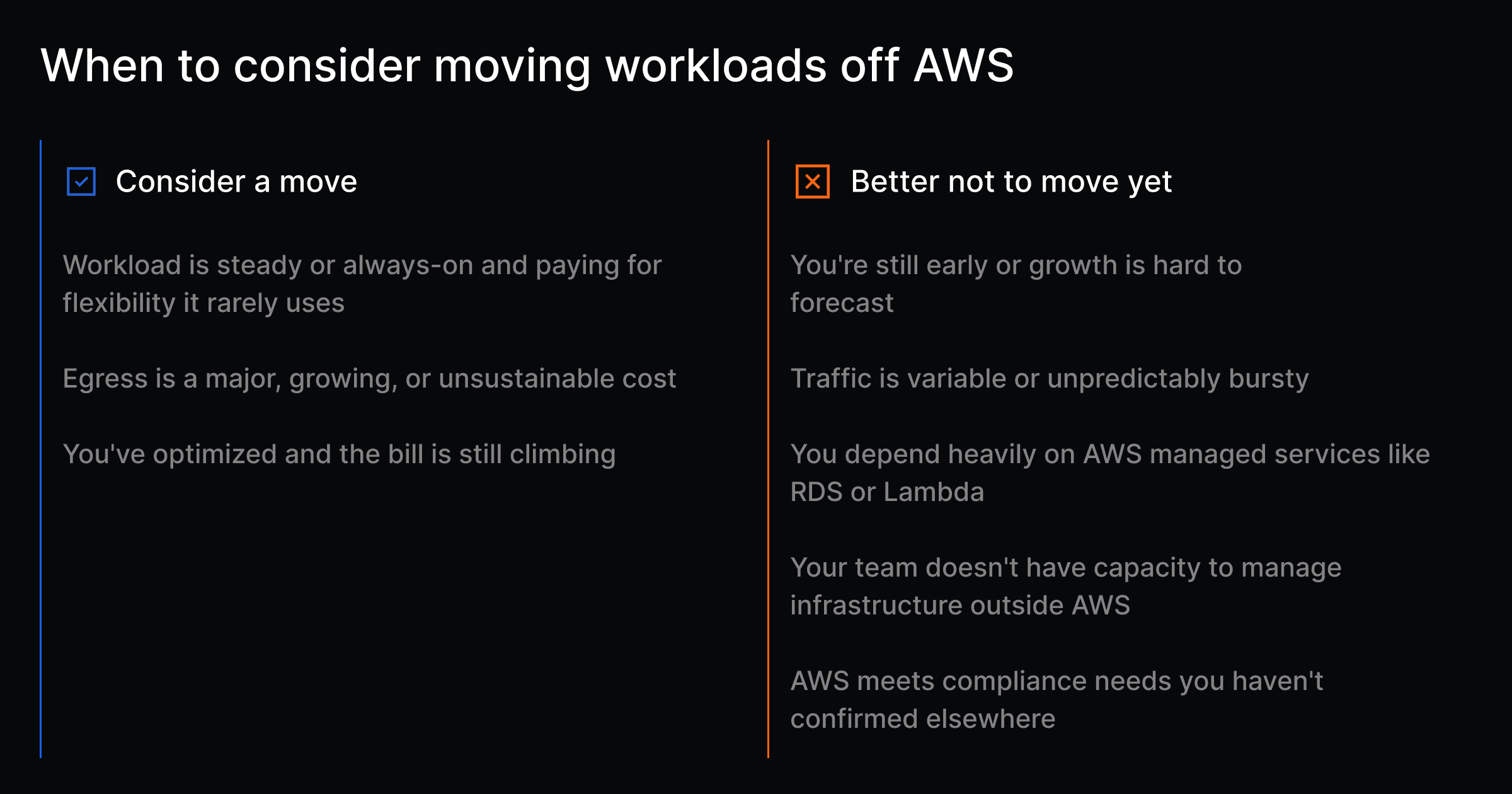
You should be seriously evaluating a change if:
Your workloads are predictable and steady, and you’re paying for flexibility you rarely use
Egress is a major and growing cost driver
You’ve already optimized and the bill is still climbing
You should probably stay on AWS for now if:
You’re early and growth is hard to forecast
Traffic is variable or comes in unpredictable bursts
You rely heavily on managed services like RDS or Lambda
Your team doesn’t have the capacity to manage infrastructure outside AWS
Your compliance requirements are tightly coupled to AWS certifications
If your situation falls somewhere in between, selective repatriation is usually the practical path. You don’t need to go all in.
Most teams that approach this well move only the workloads where they’re being penalized, typically high-traffic, steady services, and leave everything else as is.
That’s often enough to change the economics without taking on unnecessary risk and deliver meaningful AWS cost savings.
What making a change actually looks like
Identifying that your AWS bill is a problem is one thing, finding a suitable AWS alternative is another.
When people think about leaving AWS, they often picture going back to running their own servers and all the operational burden that comes with it.
That’s one option, but it’s not the only one. There’s a spectrum of alternatives, each with a different balance of control and responsibility:
Infrastructure model | Explanation |
|---|---|
On-premise data center | You own and operate the hardware and software in your own facility. |
Colocation | You own the hardware but place it in a third-party data center. They handle power, cooling, and connectivity. You handle everything else. |
You rent dedicated physical servers. The provider manages the hardware; your team manages the software. You get single-tenant performance and predictable pricing without owning the equipment. | |
VPS hosting | You rent a virtual machine on shared hardware. Often comes with lower cost and less abstraction than hyperscalers, but still subject to the tradeoffs of multi-tenant infrastructure. |
Once you’ve selected a model that works for you, it’s a good idea to plan out your migration in stages.
Map dependencies ahead of time. Pick a low-risk workload. Get it running cleanly before touching anything else. Once you’ve done it once, the process becomes repeatable.
How to validate the decision before committing
Unless you’re making the call on your own, it helps to align everyone early. That might be your team, a CTO or CFO, or the board.
Start with the numbers. Look at your current bill, then project it forward.
What does it look like in six months?
What happens if traffic doubles?
Identify which line items are actually driving the increase. And share that analysis with others.
Then compare that against a realistic alternative. Don’t just look at raw compute or hardware. Factor in total cost of ownership, including the time and headcount needed to run infrastructure outside AWS, any re-architecture work, and the effort to migrate.
Finally, talk to the engineers closest to the system. They’ll surface constraints and edge cases that don’t show up in billing data, and you’ll need their buy-in when it’s time to execute.
The smart answer might be “not yet”
A painful AWS bill isn’t always a signal to move today. Sometimes the right call is to wait.
After a clear look at the situation, some teams realize they don’t have the capacity to manage infrastructure outside of AWS yet. The current setup works, and shifting it would introduce more risk than it removes. That’s a valid reason to hold off until the team has the time, skills, or headcount to do it properly.
Others dig in and find they’re more locked in than expected. If your systems depend heavily on AWS services like RDS or Lambda, a clean migration may require re-architecting parts of the stack first. That takes time.
Those are reasonable conclusions that can save you from regret. Where teams get into trouble is moving too quickly, chasing cost savings without accounting for what it takes to run things on the other side.
Is It Time to Consider an AWS Cost Reduction Strategy?
AWS is a good place to build, and for many teams, a good tool to keep in their infrastructure stack. The question is whether AWS’s billing still makes sense for where your workloads are today.
Teams that handle this well don’t react to a single bad month. They define a threshold ahead of time, a point where the cost no longer lines up with the value. When they hit it, they act with a clear understanding of why.
If you’re at that point, or getting close, Rackdog offers dedicated bare metal servers with flat monthly pricing. We handle the hardware. Your team gets high-performance infrastructure that works with the same tools and workflows you’re already using. We even offer a complete migration guide to assist with your transition.
If you want to crunch the numbers or talk through what a move would look like, our team of infrastructure experts is ready to help.
Ready to deploy your first server? Create an account to start deploying, or talk to an expert to explore a custom bare metal solution that's right for you.